Best Free AI Photo Editor 2026: 7 Tested, No Watermark
TL;DR
Photoroom is the best free AI photo editor for most people right now: it gave us a full-resolution, watermark-free cutout without even creating an account. Fotor is the surprise runner-up — the watermark that used to spoil its free tier is gone as of our 10 July 2026 re-test. Pixlr is the pick if you want a real layered editor around the AI tools, and Adobe Express is the safe corporate choice if you can tolerate its upsells. Canva is not a free photo editor — its background remover is Pro-only, and we have the paywall screenshots to prove it. VibeDex is an independent AI comparison engine that runs its own blind benchmarks and platform tests.
Editing one image is a different question from choosing a suite. Our 10-platform Creative AI Platform landscape rates the big suites on product and ad visuals, task by task, inside the logged-in product. See the Creative AI Platform landscape.
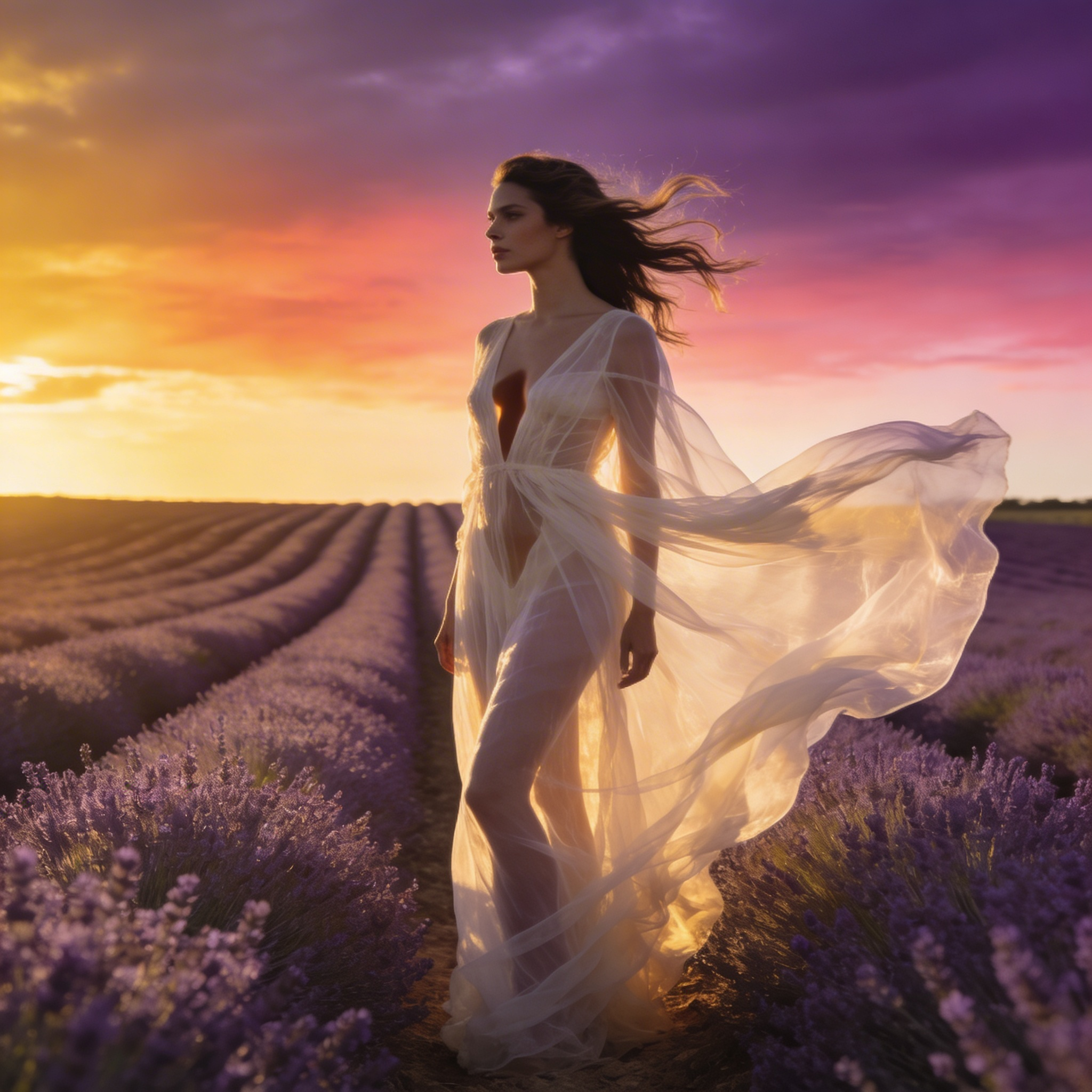
Our hair-edge test image · tested 10 July 2026
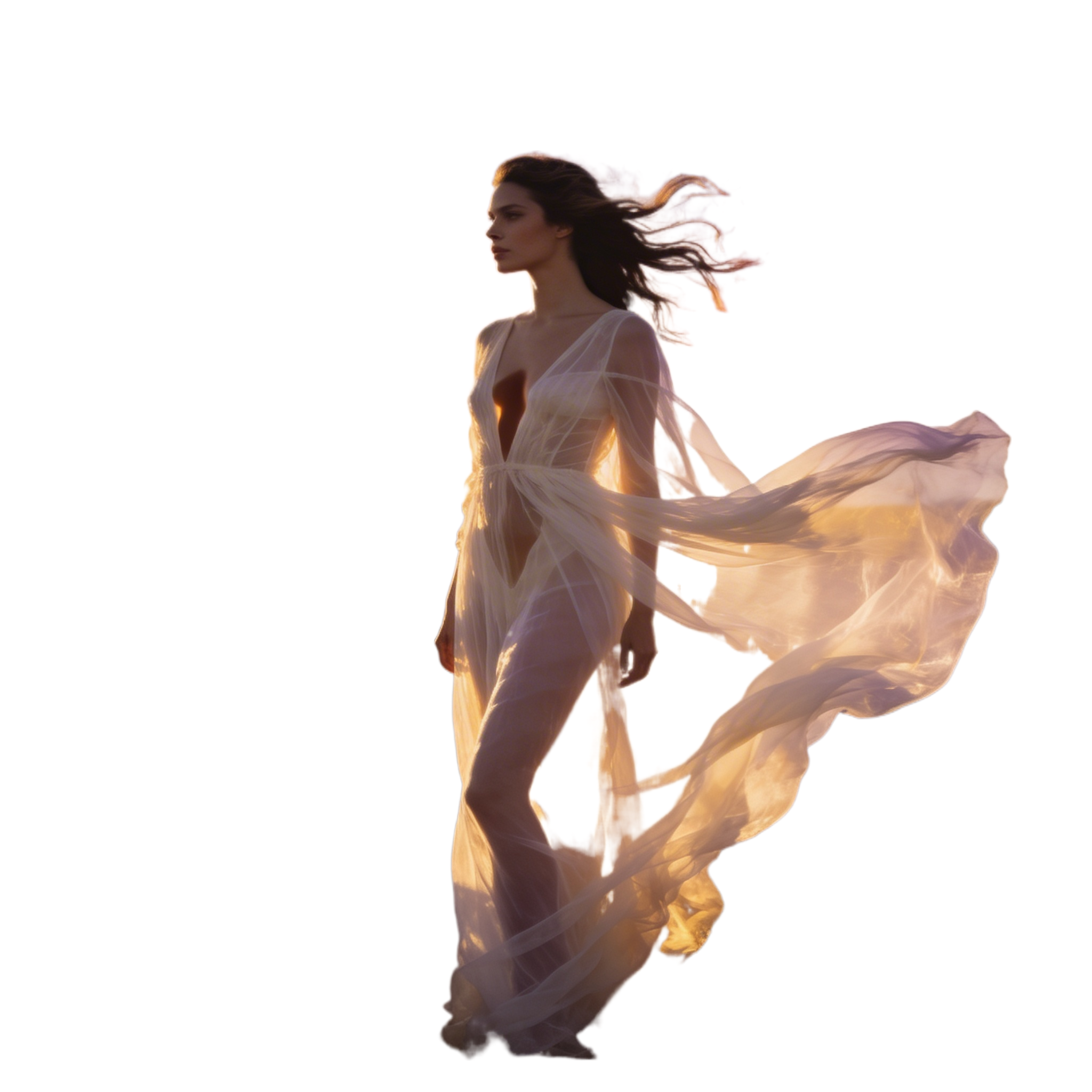
“The same 2048px portrait — flying hair against a busy sunset — run through every tool's free tier. Click any image to compare full-size.”
Original

Photoroom (free)
Fotor (free)

Pixlr (free)

Adobe Express (free)

Picsart (free)
Recommended Benchmarks
- How Vibedex Tests Creative AI PlatformsHow Vibedex tests Creative AI Platforms: buyer KPCs, real workflows, direct in-product checks, user feedback and market reviews, and how the scores are built.
- Best Free AI Background Remover (2026)Best free AI background remover: 12 Creative AI Platforms ranked by what the free tier delivers. Recraft and Picsart lead on no-signup; Photoroom on commercial.
- Best Free AI Headshot Generator 2026: What Free Gets YouMost free AI headshot generators are paid trial funnels. We tested Canva (one real free headshot a day, proof inside) and mapped which free paths are real.
- Fotor AI Review (2026): What's Free, Watermarked, RiskyFotor AI review: the free tier gives 6 starter credits and 12 standalone tools, several no-signup, but every export is watermarked and billing trust is risky.
- Best Free Canva Alternative (2026)Best free Canva alternative: 6 tools ranked by what the free plan delivers. Fotor, Pixlr, Picsart, Ideogram, NightCafe and Renderforest each win on one axis.
- Best Free AI Image Generators (2026)10 free AI image generators ranked by what the free plan really delivers: watermarks, commercial use, signup. Ideogram and Leonardo export with no watermark.
How We Tested (With Proof)
On 10 July 2026 we ran the same test image through every tool below, in our own browser, on each tool's free tier. The image is a deliberately brutal cutout test: wind-blown hair strands and translucent fabric against a busy lavender-field sunset. It's one of our own AI-benchmark renders, so we own the rights to every pixel published here.
For each tool we recorded four things: whether the free tier actually reached the tool, the resolution of the real downloaded file (not the preview), whether a watermark appeared, and how many upsell interruptions stood between upload and download. Every before/after in this article is the genuine output file. Where a tool blocked us, we say so and show the paywall instead — a blocked result is a result.
We don't score subjective quality here; we show you the outputs and let you judge the hair edges yourself. Platform-level trust data (billing complaints, support risk) comes from our Creative AI Platform methodology.
What “Free” Actually Means, Tool by Tool
“Free” means four different things in this market, and the difference matters more than any feature list: some tools are free forever for this job, some give you a monthly allowance that renews, some give one-time intro credits, and some are free only until the trial clock runs out. Here's where each tool we tested actually lands:
| Tool | Kind of free | What you get ongoing |
|---|---|---|
| Photoroom | Free ongoing, unmetered (tested) | Standard-resolution background removal is free and unmetered on the web tool (we ran it logged out). The free account plan lists 250 exports/month on core tools; HD export and batch need Pro. |
| Fotor | Free ongoing, unmetered (tested) | Background removal was free and unmetered in our run. Fotor’s generative AI tools (image generation, AI effects) still run on limited free credits — the un-watermarking we verified applies to the background remover, and we’re re-checking the other tools next update. |
| Pixlr | Free ongoing, unmetered (tested) | The background remover ran without visibly consuming AI credits. Pixlr’s generative tools (AI image generation, generative fill) are credit-metered on the free tier; paid plans start at €2.49/mo (Plus, 80 credits) and €9.99/mo (Premium, 1,000 credits) — EUR pricing shown to us, geo-dependent. |
| Adobe Express | Free with monthly limits | Quick actions like background removal are free on an ongoing basis with an Adobe account. Generative AI features draw from Adobe’s shared generative-credit pool (a small monthly allowance on free accounts — the same meter Firefly uses, which is genuinely confusing; see the Adobe note below). |
| Picsart | Free with monthly limits | The background remover itself ran free in-page. Picsart’s wider AI tools are credit-limited on the free tier with occasional watermarks on some features per its own documentation. |
| Canva | Not free for photo editing | See the paywall notes below. |
| Recraft | Not free for photo editing | See the paywall notes below. |
Quota numbers are the platforms' own stated figures as of our test date; where a platform doesn't disclose a number, we say so rather than guess. All checked 10 July 2026; prices re-checked against each vendor's pricing page on 27 August 2026 (Photoroom, Pixlr, Adobe Express and Canva unchanged; Photoroom's logged-out download re-run the same day).
Photoroom — Best free background remover overall
We uploaded our 2048px test portrait to the web background remover without creating an account. It processed in seconds and let us download the full-resolution 2048×2048 transparent PNG — no signup, no watermark, no credit meter. Individual flying hair strands survived; the one visible flaw is that the sunset glow stays baked into the translucent fabric, so sheer materials keep ghost colors from the old background. We re-ran the same upload, still logged out, on 27 August 2026 and got the identical file back byte for byte: still full resolution, still no watermark.
Our test image · Photoroom free tier · 10 July 2026
“Original vs. the actual file we downloaded from the free tier.”
Original
Photoroom output
Why it's here
- Full 2048px transparent PNG, free, without even signing up
- Best hair-strand preservation of everything we tested
- Product-photo workflow (staging, backgrounds) in the same app
Watch out for
- Sheer/translucent materials keep colors from the removed background
- Trustpilot billing complaints are serious — be careful with paid upgrades
- One upsell modal after every download
Choose Photoroom if you want the best free cutout with the least friction, especially for product shots.
Free (no signup for standard res). Pro from £5.99/mo billed yearly (price shown in GBP, geo-dependent).
Fotor — The comeback: watermark is gone
This is the finding that surprised us. In May 2026 our platform test recorded Fotor’s free photo-editing output as watermarked and restricted — it cost Fotor the top spot in the previous version of this article. Re-testing on 10 July 2026, the background remover advertised “Free HD Download, No Watermarks, No Sign-Up Required” and delivered exactly that: a clean 2048×2048 transparent PNG on a free account, no credits consumed. Quality is a near-match for Photoroom, with slightly more pink color fringing where the sky showed through flying hair.
Our test image · Fotor free tier · 10 July 2026
“Original vs. the actual file we downloaded from the free tier.”
Original
Fotor output
Why it's here
- Clean full-resolution download, free — the May watermark is gone
- Fast one-click flow with color-background presets
- Broad editor suite around it (retouch, effects, collage)
Watch out for
- Pink/purple edge fringing on fine hair against bright skies
- Free-tier terms changed within weeks — what’s free today may be metered tomorrow
- Post-download "Edit for Free" upsell modal
Choose Fotor if you want a Photoroom-quality free cutout inside a fuller photo-editor suite.
Free for background removal (tested). Paid plans unlock AI credits and premium tools.
Pixlr — Best browser editor around a free cutout
On a free account, we dropped the test portrait into Pixlr’s background remover. It processed in about ten seconds and returned the full 2048×2048 PNG (delivered as a zip), no watermark, with zero upsell interruptions during the task — the calmest flow we tested.
Our test image · Pixlr free tier · 10 July 2026
“Original vs. the actual file we downloaded from the free tier.”
Original
Pixlr output
Why it's here
- Full-resolution free download with no watermark
- No upsells mid-task — unusually respectful free flow
- A real Photoshop-style layered editor if you need to keep working on the image
Watch out for
- Free tier of the generative tools is credit-limited
- Slightly softer hair edges than Photoroom/Fotor in our test
Choose Pixlr if you want your free cutout inside a proper layers-and-tools editor rather than a one-trick page.
Free (account required). Plus from €2.49/mo; Premium €9.99/mo.
Adobe Express — Full-res free, but the pushiest flow
Uploading on the marketing page threw us into the full Express editor, where the cutout was already applied. Before we could download it we dismissed a plan-upsell modal (Premium: £9.98/mo after a 30-day trial) and a satisfaction survey. The download itself was a clean, full 2048×2048 transparent PNG on the free plan — upscaling the export beyond 1× is premium-gated.
Our test image · Adobe Express free tier · 10 July 2026
“Original vs. the actual file we downloaded from the free tier.”
Original
Adobe Express output
Why it's here
- Full-resolution transparent PNG on the free plan
- Pass-grade trust profile — no billing horror stories in our data
- Slots into a full design suite (templates, resize, brand kits)
Watch out for
- Two interruptions between upload and download in our run
- Export size multiplier is premium-gated
- Fine hair wisps clipped harder than Photoroom in our test
Choose Adobe Express if you want a commercially safe cutout from a name your finance team already approves.
Free plan (Adobe account). Premium £9.98/mo incl VAT after 30-day trial (GBP shown, geo-dependent).
Picsart — Good cutout, murkier free path
The tool page processed our portrait without a login wall and showed a clean full-resolution result. Clicking Download bounced us into the full Picsart editor instead of giving the file — we retrieved the 2048×2048 PNG, but the formal free-export path is less direct than the others, and we’ll pin down its exact export behavior in the next update.
Our test image · Picsart free tier · 10 July 2026
“Original vs. the actual file we downloaded from the free tier.”
Original
Picsart output
Why it's here
- No login wall to process an image
- Full-resolution result quality in line with the leaders
- Strong mobile apps if you edit on your phone
Watch out for
- Download redirects into the full editor — most friction before the file
- Free-tier watermark rules vary by feature and are poorly documented
Choose Picsart if you already live in Picsart’s mobile ecosystem and want the same tools on the web.
Free tier with credit limits. Plus plans unlock HD exports and remove feature gates.
The Ones That Say Free But Aren't
Two big names market free photo editing that didn't survive contact with our test. We include them because you'll see them in every other roundup — usually without this part.
Canva
Canva’s editor accepted our upload happily, but the BG Remover, Magic Eraser, Magic Edit, and Upscale tools all carry a Pro crown on the free plan. Clicking BG Remover opened a trial paywall (Pro £13/mo, Business £18/mo after 30 free days, GBP shown). Canva Free does include a monthly allowance of standard AI uses for other features — but the photo-editing tools this article is about are not in it. If your edit ends in a template or social design, Canva is still worth the trial; as a free photo editor, it isn’t one.
Recraft
Recraft’s “free background remover” page processed our image and showed us the result — then required a sign-in to Recraft Studio to actually download it, after silently rejecting our original PNG for exceeding a 5MB upload cap. Free output from Recraft is also not commercially usable per its terms. Its pricing page (checked 27 August 2026) now spells the free tier out: 3 generations per style per day, 3 image uploads a day, every image public, no commercial use. Fine as a generator you already use; not a free photo editor.
Adobe Express vs Firefly, Untangled
Adobe ships two overlapping free AI apps, and the confusion is common enough that people literally search “adobe express vs firefly.” The short version: Adobe Express is the Canva-style design app — its quick actions, including the background remover we tested above, are free on an ongoing basis. Adobe Firefly is the generative studio (text-to-image, generative fill) metered by generative credits, with a small monthly allowance on free accounts. The catch: Express's generative features draw from the same credit pool as Firefly, so the two “free tiers” share one meter. If you're editing photos, start with Express; if you're generating images, that allowance is what you're budgeting. We're putting Firefly through the same fixture test in this article's next update.
Also Considered
Photopea (the genuinely free, ad-supported Photoshop clone) and Adobe Firefly are queued for the next update of this test. Remini, Clipdrop, YouCam, and Magic Hour appear in competing roundups but are either mobile-first, single-purpose, or vendors ranking themselves — we'll add any of them that readers ask for. Freepik (now Magnific) has no general free tier for AI tools and is covered in our Magnific review.
Sources & References
All external sources were verified as of 2026-08-27. Ratings and metrics reflect the most recent data available at time of review.
- Photoroom - Background Remover(photoroom.com)
- Photoroom - Pricing(photoroom.com)
- Fotor - Background Remover(fotor.com)
- Pixlr - Background Remover(pixlr.com)
- Pixlr - Pricing(pixlr.com)
- Adobe Express - Background Remover(adobe.com)
- Canva - Pricing(canva.com)
- Picsart - Background Remover(picsart.com)
- Recraft - Background Remover(recraft.ai)
- Vibedex - Creative AI Platform methodology
Related VibeDex Benchmarks
Vibes is everything — a Vibedex × Fotor perspective
Generation got easier. Attention got scarcer. A joint perspective on vibe branding and vibe marketing by Johnathan Kwok and Nora Chen.
RoundupsBest AI Product Photography Tools (2026)
Best AI product photography tools: 11 Creative AI Platforms checked, 4 with named e-commerce workflows: Photoroom, Krea, Fotor and Magnific (formerly Freepik).
RoundupsBest AI Tools for Static Social Ad Creative (2026)
Best AI tools for static social ads: 11 Creative AI Platforms checked. Canva, Recraft, Adobe Express, Leonardo, Picsart, Photoroom and Fotor are specialized.
Methodology: VibeDex tests Creative AI Platforms via agent-assisted public-surface verification. We check capability presence, free-tier access, export status, watermarks, paid floors, and trust signals — only what a buyer can verify before paying. We do not subjectively rate output quality. See our full methodology
FAQ
What is the best free AI photo editor with no watermark?
Photoroom, in our 10 July 2026 test. It returned a full 2048×2048 transparent PNG with no watermark and no signup. Fotor and Pixlr matched the clean full-resolution download on free accounts; Adobe Express did too, with more upsell friction.
Is Fotor’s free photo editor still watermarked?
Not for background removal. Our May 2026 test recorded watermarked free output, but re-testing on 10 July 2026 produced a clean full-resolution download with no watermark, matching Fotor’s new “No Watermarks” claim. Its generative AI tools still use limited free credits.
Can I remove backgrounds for free in Canva?
No. On Canva Free the BG Remover carries a Pro badge, and clicking it opens a trial paywall (Pro £13/mo after 30 free days when we tested). Canva’s free monthly AI allowance covers other features, not background removal.
Which free AI photo editors work without signing up?
Photoroom’s background remover gave us a full-resolution download with no account at all. Picsart processed without a login wall but pushed us into its editor to get the file. Everything else we tested wanted at least a free account before the download.
How were these tools tested?
We ran the same 2048px portrait — flying hair against a busy sunset, a deliberately hard cutout — through each tool’s free tier in our own browser sessions on 10 July 2026, then compared the actual downloaded files for resolution, watermarks, and edge quality. Every before/after image in this article is the real output. We generated the test image ourselves, so we own every pixel shown.
Compare Creative AI Platforms by what they actually deliver
VibeDex tests free-tier access, export status, paid floors, and trust signals across the major Creative AI Platforms — so you know what each one costs before you pay.
See how we test →